
Features
Interview mode
MiuWave listens for the interviewer's questions and shows suggested-answer cards right on the Live translation screen, based on your profile.
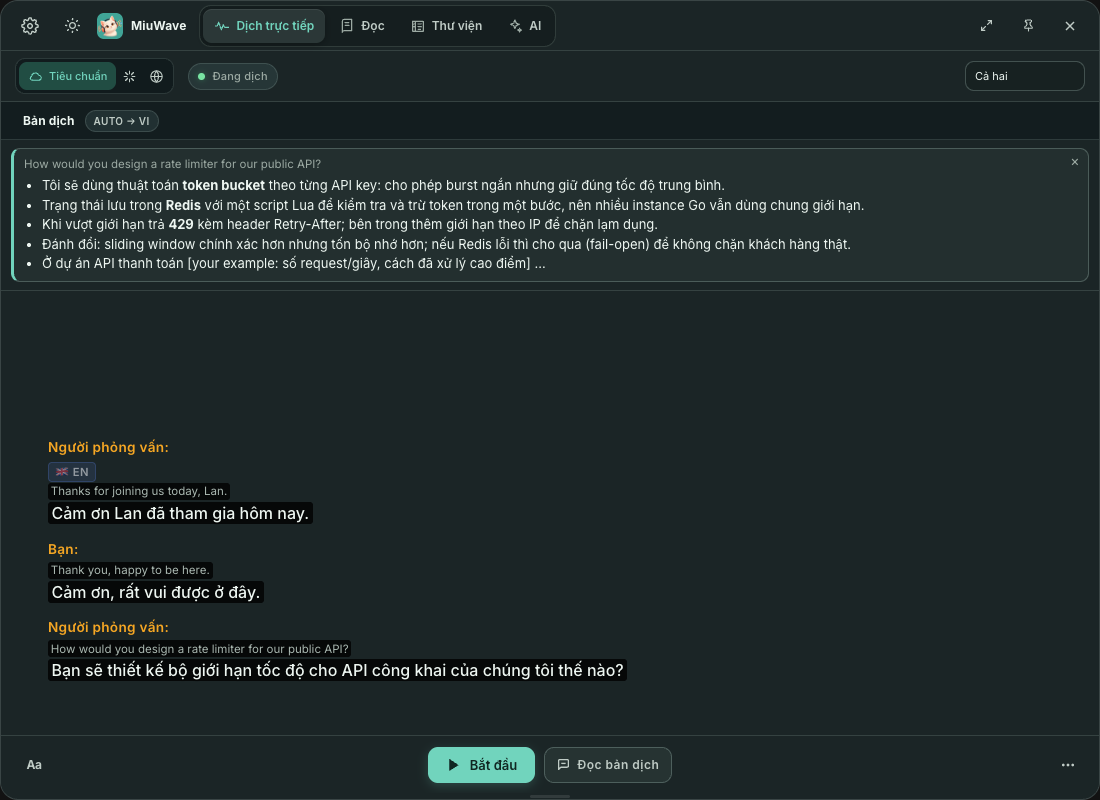
Turn on Interview mode
- Set up an AI source Interview mode uses the same source as AI Companion. OpenAI or Gemini is recommended.
- Create a profile In the AI tab, click Sửa hồ sơ (Edit profile) and fill in your profile (see below).
- Flip the switch Turn on Chế độ phỏng vấn (Interview mode) in the AI tab, then choose a profile and the suggestion language (default Gợi ý: cùng ngôn ngữ với AI, Suggestions: same language as AI).
- Choose the Both audio source For online interviews, choose Cả hai (Both) on the Tiêu chuẩn (Standard) engine (Soniox) so the app can tell your voice (microphone) from the interviewer's (system audio).
- Start the session Go back to Dịch trực tiếp (Live translation) and click Bắt đầu (Start). When a question comes up, a suggestion card appears above the transcript.
Interview profile
The Hồ sơ phỏng vấn (Interview profile) dialog has these fields:
| Field | Example |
|---|---|
| Tên (Name) | Jane Doe |
| Vị trí ứng tuyển (Position applied for) | Backend Engineer at company X |
| Lĩnh vực / công nghệ (Field / tech stack) | Backend Go, PostgreSQL, Kubernetes, AWS… |
| CV tóm tắt (Short CV) | Experience, skills, projects, achievements… |
| Ghi chú (Notes) | Points to stress, questions to ask back, tone… |
You can keep several profiles (Hồ sơ mới (New profile), Xoá (Delete)) and use one at a time. Click Lưu (Save) to save. Lĩnh vực / công nghệ (Field / tech stack) helps technical suggestions match your stack.
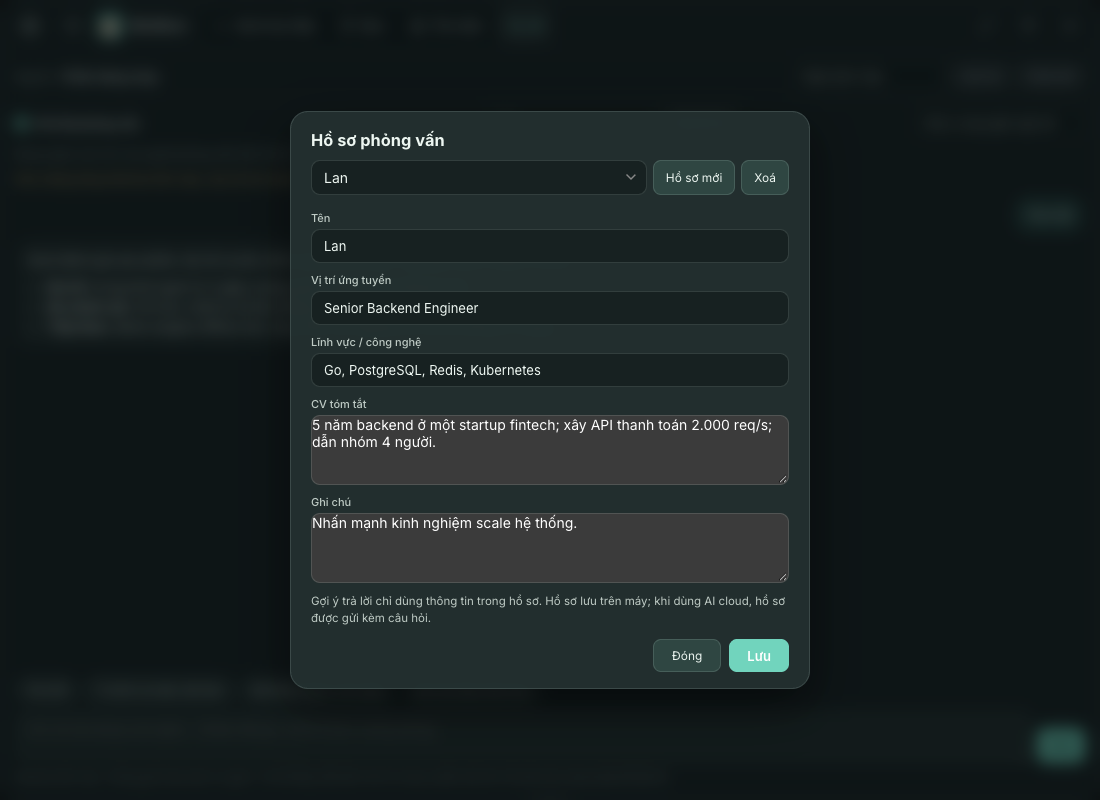
Suggested answers use only the information in your profile. Profiles are stored on your computer (interview-profiles.json); with a cloud AI, the profile is sent along with the question.
Technical questions and questions about you
Concepts, algorithms, system design, code
3–5 points on the approach, key terms and trade-offs, plus a short code snippet when code is the clearest answer.
Experience, projects, situations
3 short points that use only your profile. Missing stories show up as blanks for you to fill in, instead of being made up.
Technical knowledge comes from the AI, but information about you comes only from your profile. Questions are detected from question marks, question words and requests such as “tell me about…” (English, Vietnamese, Japanese, Chinese, Korean); uncertain ones are confirmed by the AI in the same call. Suggestions are based on your profile and the last few lines of the conversation, in the language you choose.
You / Interviewer labels
With the Cả hai (Both) audio source on the Tiêu chuẩn (Standard) engine (Soniox), each line is labelled by speaker: the microphone is Bạn (You), system audio is Người phỏng vấn (Interviewer). Questions you ask yourself never trigger a suggestion.
With other engines there are no labels, and every question heard gets a suggestion. The Qwen engine returns only the translation, without the original text, so Interview mode doesn't work with it yet.
Use a cloud AI
Suggestions prefer OpenAI or Gemini when you have a key. If on-device Gemma is your only source, the AI tab warns that technical answers will be weak and error-prone: in testing, the 4B model made up experience and got technical facts wrong. Enter the OpenAI key in Cài đặt (Settings) → Engine dịch (Translation engine), and the Gemini key in Cài đặt → Dịch nhanh (Quick Translate).