
Get started
Choose an engine
MiuWave has five engines for speech recognition and translation. They differ in speed, cost, number of languages and whether they need a network connection.
At a glance
| Engine | Latency | Cost | Languages | Platforms |
|---|---|---|---|---|
| Soniox | ~2 s | ~$0.12/hour | 70+ source languages → any target language | macOS, Windows |
| OpenAI Realtime | ~2 s | ~$4/hour, voice included | 13 target languages | macOS, Windows |
| Qwen LiveTranslate Flash | ~4 s | Free (preview), text only | 60+ source and target languages | macOS, Windows |
| Local MLX | ~2 s (M1 Pro; first word ~1.8 s) | Free | Japanese/English/Chinese/Korean → Vietnamese/English | Apple Silicon Macs only |
| SenseVoice | Original text ~0.5 s, then the translation | Free recognition + the cost of the engine under Dịch bằng (Translate with) | Source: Chinese, English, Japanese, Korean, Cantonese | Any CPU (Windows, Intel Mac, Apple Silicon) |
Which engine should I choose?
Everyday use
Soniox: cheap, fast, many languages, two-way translation.
Important meetings that need translated speech
OpenAI Realtime: the most natural translations, with built-in voice, but about 34 times more expensive than Soniox.
Want to try it for free
Qwen LiveTranslate Flash during its preview.
No network, privacy first
Local MLX on Apple Silicon Macs, or SenseVoice on any computer.
Switch engines
When you open the app, the Chọn chế độ dịch (Choose translation mode) screen groups the engines into three modes: Tiêu chuẩn (Standard: Soniox / Local / SenseVoice), OpenAI Realtime and Qwen LiveTranslate Flash. You can switch modes at any time with the Tiêu chuẩn (Standard) · OpenAI · Qwen buttons in the top bar.
To pick one exact engine, open Cài đặt (Settings) → Engine dịch (Translation engine) → Engine. Engines without a valid key are dimmed in the list.
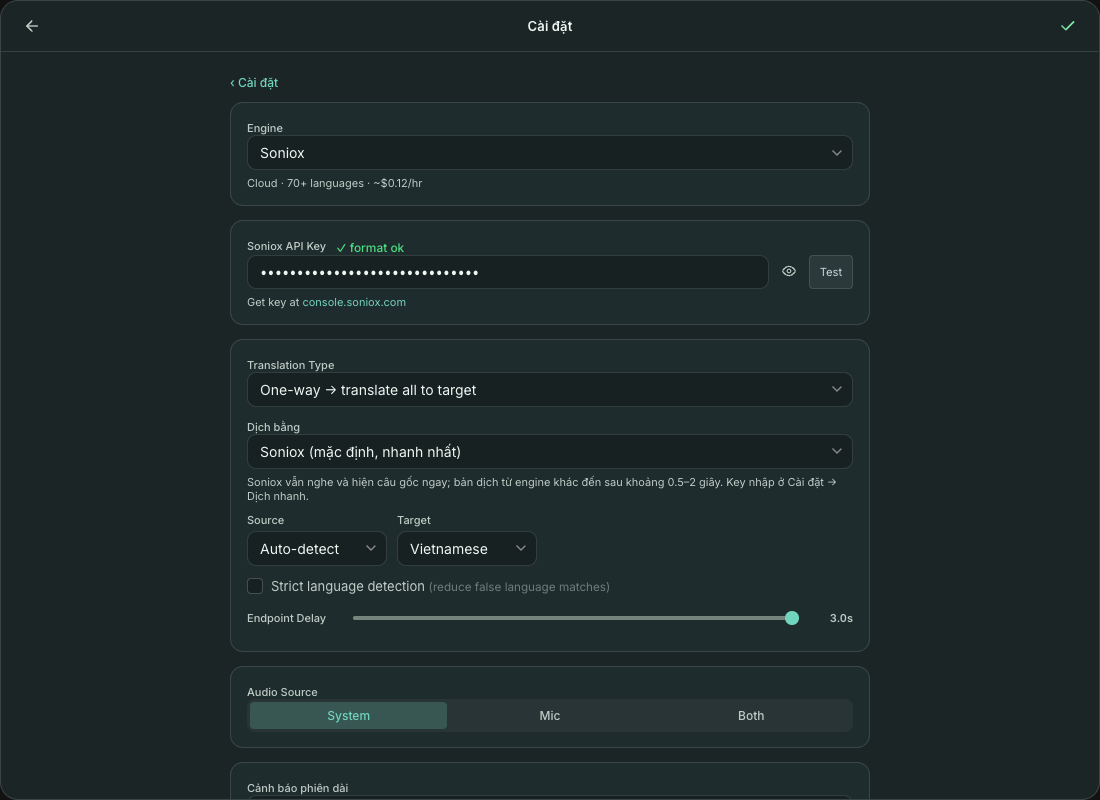
Soniox
The default, recommended engine. Real-time speech recognition and translation in the cloud.
- 70+ source languages, translates into any target language; it returns the original text, so the two-column view works.
- Supports two-way translation and reading translations aloud with TTS.
- Dịch bằng (Translate with): keep Soniox's own translation (default, fastest) or let Google, DeepL, OpenAI, Gemini, Ollama or Local MLX translate what Soniox hears. The original text still appears immediately; a translation from another engine arrives about 0.5–2 s later.
- With the Cả hai (Both) source, each line is labelled by speaker (the microphone is you, system audio is the other side). See Interview mode.
OpenAI Realtime
Live translation with OpenAI's gpt-realtime-translate: it returns both translated text and translated speech on the same connection, with no separate TTS step.
- Costs about $4/hour, billed to your OpenAI account.
- 13 target languages: en, es, pt, fr, de, it, ru, hi, id, vi, ja, ko, zh. For Thai and other languages, use Soniox.
- No two-way translation, and you can't choose a separate TTS voice while using this engine (the voice comes from the model and is off by default).
Qwen LiveTranslate Flash
Alibaba DashScope's qwen3-livetranslate-flash-realtime model, currently free during its preview (pricing may change after the preview).
- 60+ languages, returns translated text only: no voice and no original text, so no two-column view.
- You must choose the source language: Auto-detect is hidden when this engine is selected.
- The key must be created in the Singapore region. See how to get a key and WebSocket error.
- No two-way translation and no TTS. Interview mode doesn't work yet either, because there is no original text.
Local MLX (Apple Silicon only)
Runs 100% on your Mac with MLX, Whisper large-v3-turbo and Gemma-3-4B. No network needed after installation.
- Japanese, English, Chinese, Korean → Vietnamese or English.
- Sentences are cut where the speaker pauses, so each one is translated as soon as it ends and the translation appears word by word. On an M1 Pro: a sentence is fully translated about 2.2 s after it ends (p50; p95 under 4 s), with the first word after about 1.8 s.
- The first time you choose Local, the app runs a one-time install of about 5 GB (Python environment, models, voice activity detection model). After an update that needs new components, the app asks to run the setup again; models already downloaded are reused.
SenseVoice (offline, any computer)
Offline speech recognition for Chinese, English, Japanese, Korean and Cantonese on any CPU — including Windows and Intel Macs, where Local MLX can't run.
- The model is about 163 MB, downloaded once.
- The original text appears about 0.5 s after speech; each sentence is translated by the engine chosen under Dịch bằng (Translate with). Left on the Soniox default, Google is used; choose Ollama or Local MLX to stay fully offline.
- One-way translation only.